
777CX Game Download: Latest Earning App Free For Android
Today
7mb
V1.01
Andoid+6.01
90k
Description
Content Table
Creating an account is usually the first step for users who want to explore the features of an online gaming platform. However, registration forms and login options can be confusing if you are using a platform for the first time.
This 777CX Game register and login guide explains the general steps in simple English. You will also learn how to recover a forgotten password, deal with common login errors, and protect your account information. Since different websites use the 777CX game name, always check the platform and its current instructions before entering your details. Must Try: 1EE Game
What Is 777CX Game?
777CX Game is a name used by online gaming websites that describe a platform offering different games in one place. Depending on the platform and its current game selection, users may find slots, card games, fishing games, and other casino-style activities.
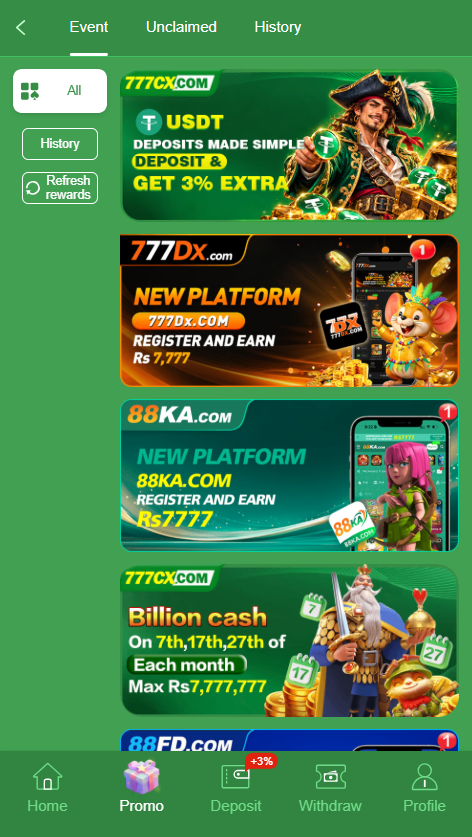
An account may allow users to access the game lobby, manage their profile, check promotions, and view wallet options. However, features and account requirements can differ between platforms. Read the current terms and privacy information before registering.
Some games may involve real money. In these games, users can lose money, so they should not be treated as a guaranteed way to earn income.
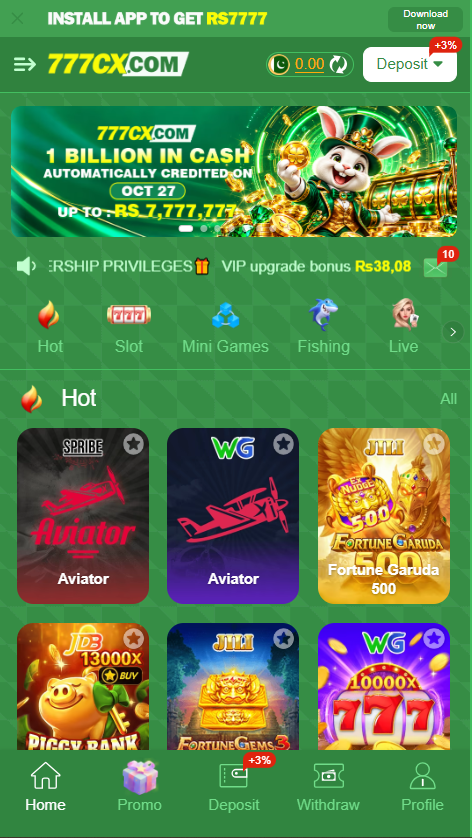
777CX Game Register and Login at a Glance
| Topic | Information |
|---|---|
| Platform name | 777CX Game |
| Registration | Look for Register or Sign Up |
| Login | Use the details linked to your account |
| Password recovery | Check for a Forgot Password option |
| Verification | An OTP or other verification may be required |
| Device access | Check the current platform for supported devices |
| Account support | Use the support option shown on the verified platform |
| Minimum age | Check the platform’s rules and local law before registering |
The exact form fields and verification steps may change. Always follow the instructions shown on the platform you have verified.
Before Creating a 777CX Game Account
Taking a few minutes to check the platform can help you avoid problems later. Before you register, make sure you understand where you are entering your information.
Check the Website or App
Several websites use the 777CX name. Before entering your details, check the web address, operator information, and support details carefully.
Do not assume a website is official just because it uses the 777CX logo or name. If you cannot verify who operates the platform, be cautious about creating an account.
Review the Terms and Privacy Policy
The terms can explain the platform’s age requirements, account rules, and payment conditions. The privacy policy should explain what personal information the operator collects and how it uses it.
If either document is missing or unclear, consider that before continuing.
Prepare Your Account Details
Depending on the registration form, you may be asked for:
- A username
- A mobile number or email address
- A password
- A verification code
- A CAPTCHA or other security check
- Confirmation that you meet the age requirement
The actual fields may differ. Use information you can access later, especially if it will be needed for account recovery.
How to Register on 777CX Game
The registration process can vary, but the following steps explain the usual account setup.
Step 1: Open the Verified Platform
Open the website or app after checking its source. Make sure the address or app details match the platform you intend to use.
Avoid clicking registration links sent by unknown people, particularly if they ask you to deposit money immediately.
Step 2: Select Register or Sign Up
Look for a button labelled Register, Sign Up, or Create Account. It is commonly placed near the login option.
Tap the button to open the registration form.
Step 3: Enter the Requested Details
Fill in the fields shown on the form. These may include a username, mobile number, email address, or password.
Check each entry before moving to the next step. A typing mistake in your phone number or email address could make account recovery difficult later.
Step 4: Create a Strong Password
Choose a password that is difficult for others to guess. Use a unique combination of letters, numbers, and symbols, or a long password generated by a password manager.
Avoid using your name, phone number, birthday, or a password you already use on another website.
Step 5: Complete Verification
The registration page may ask you to complete a CAPTCHA or enter a one-time password sent to your phone or email.
If you receive an OTP, enter it only on the registration screen you are using. Never share the code with another person, even if they claim to work for customer support.
Step 6: Read the Terms and Submit
Review the age requirement, terms of use, and privacy policy. If you agree and meet the requirements, submit the form.
After registration, you may be signed in automatically or asked to log in. The exact process depends on the platform.
How to Login to 777CX Game
If you already have an account, you can use the login option instead of creating another one.
- Open the platform or app you used to register.
- Select Login or Sign In.
- Enter your registered username, phone number, or email address, depending on the form.
- Enter your password.
- Complete verification if the platform asks for it.
- Tap Login to access your account.
If the details do not work, check them carefully before trying again. Repeated failed attempts may temporarily restrict access on some platforms.
777CX Game Login With a Mobile Number
Some 777CX game websites describe login using a mobile number and password or verification code. However, the available method depends on the specific platform.
If your login screen offers a mobile number option:
- Enter the number linked to your account.
- Follow the number format displayed on the screen.
- Enter your password or request a code if that option is available.
- Complete the login process.
Use only the phone number associated with your account. If you no longer have access to it, use the platform’s verified support channel to ask about recovery.
How to Recover a Forgotten 777CX Game Password
Forgetting a password is common. If your platform provides a password recovery option, follow its instructions carefully.
- Open the 777CX login screen.
- Select Forgot Password.
- Enter the registered phone number, email address, or other requested information.
- Check for a verification code or recovery link.
- Complete the verification step.
- Create a new, unique password.
- Return to the login screen and sign in.
The recovery method can differ. Some platforms may use an SMS code, while others may use email or support verification.
Never give your recovery code to anyone. If someone asks for it through WhatsApp, SMS, or social media, do not share it.
What to Do If You No Longer Have Your Registered Number
If you cannot access your old phone number, first check whether the platform offers another recovery method. For example, you may have linked an email address or another verification option.
If no recovery method is shown:
- Find the support section on the platform you originally used.
- Explain that you no longer have access to your registered number.
- Ask which account recovery steps are available.
- Share only the information needed through the verified support channel.
- Never share your password, wallet PIN, or OTP.
Avoid creating a new account until you have checked the platform’s rules. Some services restrict multiple accounts.
Common 777CX Game Registration and Login Problems
Most login issues relate to incorrect details, verification problems, or connection errors. The table below can help you identify a possible next step.
| Problem | Possible reason | What you can try |
|---|---|---|
| Incorrect password | Typing error or forgotten password | Recheck the password or use recovery |
| Account not found | Wrong username, number, or platform | Check your registered details and website |
| OTP not received | Network issue or incorrect contact details | Check your signal and request a new code if available |
| Registration failed | Missing details or incomplete verification | Review the form and correct any errors |
| CAPTCHA error | Expired or incorrectly completed check | Refresh the CAPTCHA and try again |
| Page does not load | Internet or server issue | Check your connection and try again later |
| Account temporarily restricted | Repeated failed attempts or security review | Follow the on-screen instructions or contact support |
| App does not open | Device, file, or app issue | Restart the device and review the app source |
| Session expired | The session ended or timed out | Open the platform again and log in |
If a problem continues, use the support option on the platform you originally registered with.
Incorrect Username or Password
First, make sure you are using the correct login method. Your account may require a username instead of a phone number, or the reverse.
Check for extra spaces and confirm that the password is typed correctly. If you cannot remember it, use the password recovery option rather than making repeated guesses.
OTP Not Received
If the platform sends an OTP but you do not receive it:
- Check that the registered number or email is correct.
- Make sure your mobile phone has a signal.
- Check your email spam folder if the code is sent by email.
- Wait for the time shown on the screen before requesting another code.
- Contact verified support if the problem continues.
Do not request many codes in a short period. A new request may make an earlier code invalid.
Mobile Number Already Registered
If the form says your number is already registered, you may already have an account. Try signing in with your existing details or use the password recovery option.
Do not register another account without checking the platform’s rules. Duplicate accounts can cause access or verification problems.
Registration Form Not Submitting
A registration form may fail if a required field is empty or the CAPTCHA has expired.
Review the form from top to bottom. Check the username rules, password requirements, contact details, and agreement checkbox. If the form still does not work, try again later or contact support.
Account Locked or Suspended
An account may be restricted after failed login attempts or a security review. The exact reason and waiting period depend on the platform.
Read any message shown on the screen. If it does not explain the issue, contact the verified support team and ask for the reason. Do not pay an unknown person who claims they can unlock your account.
How to Keep Your 777CX Game Account Secure
Account security begins with your login details. These simple habits can help protect your information.
Use a Unique Password
Choose a password that you do not use for email, banking, social media, or other gaming accounts. A password manager can help you create and store strong passwords.
Keep OTP Codes Private
An OTP is a temporary security code. It should only be entered into the platform’s own verification screen.
Do not send an OTP to someone through a message or phone call. A person with your code may be able to access or change your account.
Check the Website Address
Before logging in, look closely at the website address. A fake page may use a similar name or logo to collect passwords.
If you are unsure about a link, do not enter your details. Use the platform you originally verified rather than a link sent by a stranger.
Log Out on Shared Devices
If you use a shared computer or phone, log out after your session. Avoid saving your password on a device that other people can access.
Review Security Settings
If the platform offers additional security options, read how they work and enable the ones that suit your account. Availability may vary.
Also, keep your registered contact details up to date if the platform allows it. This can make account recovery easier.
Can You Use One 777CX Game Account on Multiple Devices?
Some online platforms allow an account to be used on more than one device, while others place restrictions on device changes or simultaneous sessions.
Check the current terms before signing in on another phone or computer. You may be asked to complete an additional security check when using a new device.
Do not share your account details with friends or family. You remain responsible for activity carried out through your account.
Do You Need to Register Again After Deleting the App?
Deleting an app from your phone does not necessarily delete your online account. If the account still exists, you may be able to reinstall a verified app and log in using your original details.
Before reinstalling, check that you are using the same platform and a trustworthy app source. If you cannot access your account, try the recovery option or contact verified support.
Can You Change Your Registered Phone Number?
The option to change a phone number depends on the platform. Some services allow changes through account settings, while others require identity verification or support assistance.
Check the profile or security settings first. If the option is not available, contact verified support and ask about the process.
Never share an OTP from your old or new number with another person.
How to Contact 777CX Game Support
If you cannot solve an account problem yourself, look for a support or help section on the platform you originally used.
When contacting support, it can help to include:
- Your username or account ID, if available
- A short description of the problem
- The error message shown on the screen
- The device and browser you are using
- The approximate time the issue occurred
You can also provide a screenshot of the error, but check it first. Remove or hide personal information, transaction details, and verification codes.
Support should not need your password, OTP, or payment PIN.
777CX Game Account Verification
A platform may request verification when you register, change account details, or request a withdrawal. The exact requirements depend on the service and its rules.
Before uploading any document, check:
- Why the platform needs it
- Whether the request appears inside your verified account
- How the platform says it stores personal information
- Whether the document is required under the current terms
Do not send identity documents to an unknown person who contacts you through social media or messaging apps.
Is 777CX Registration Safe?
We cannot independently confirm that every website using the 777CX name is safe or operated by the same company. Before registering, check the platform’s identity, privacy policy, account rules, and support information.
A website having a registration form does not prove that it is licensed or reliable. If the operator or terms are unclear, be cautious about entering personal details or adding money.
Responsible Gaming
If you choose to use a real-money gaming platform, remember that losses are possible. No game or strategy can guarantee a profit.
Check the legal and age requirements in your location, set a spending limit, and never use money needed for essential expenses. Stop playing if it begins to affect your finances or daily life.
Frequently Asked Questions
How do I register on 777CX Game?
Open the platform you have verified, select Register, and complete the requested form. You may need to create a password and complete a CAPTCHA or verification step.
How do I log in to my 777CX account?
Open the login page and enter the details linked to your account. Depending on the platform, this may be a username, phone number, or email address, along with your password.
What should I do if I forget my password?
Select Forgot Password on the login screen and follow the recovery instructions. The platform may use a phone number, email address, or another verification method.
Why am I not receiving my OTP?
Check that your contact details are correct and that your phone has a signal. If the code is sent by email, check your spam folder. If the issue continues, contact verified support.
Can I create more than one account?
Account rules differ between platforms, and some restrict users to one account. Check the terms before registering again. If you already have an account, try logging in or recovering it first.
Can I use my 777CX account on another phone?
That depends on the platform’s device rules. You may need to verify your identity when signing in on a new device. Check the terms and keep your login details private.
Do I need to register again after reinstalling the app?
Usually, deleting an app does not automatically delete an online account. If your account still exists, try logging in with your original details after reinstalling from a verified source.
What should I do if my account is locked?
Read the message shown on the login screen and follow its instructions. If the reason is unclear, contact the support team through the platform you originally used.
Conclusion
The 777CX register and login process generally involves creating account details, completing any required verification, and signing in through the platform’s login page. If you forget your password, use the available recovery option.
Before entering your information, verify the platform and read its current terms. Keep your password and OTP private, and contact support through a verified channel if you cannot access your account.
Download links
How to install 777CX Game Download: Latest Earning App Free For Android APK?
1. Tap the downloaded 777CX Game Download: Latest Earning App Free For Android APK file.
2. Touch install.
3. Follow the steps on the screen.